PatternMaker and BarcodeMaker provide a small set of preferences that let you control how patterns and barcodes are stored, as well as specific display options for ISBN barcodes.
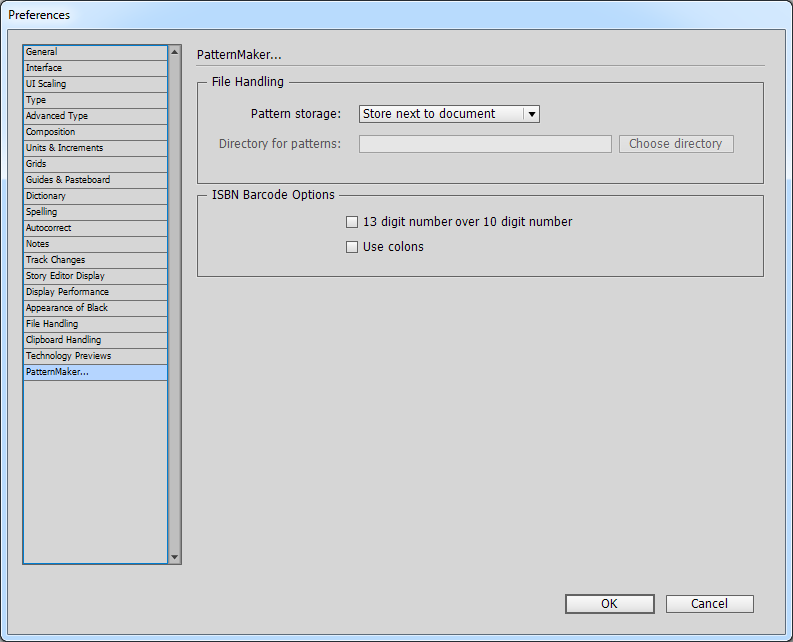
Opening Preferences
-
Windows: Edit > Preferences > PatternMaker
-
Mac: InDesign > Preferences > PatternMaker
-
Or use the PatternMaker palette flyout menu and choose PatternMaker Preferences.
File Handling
Each pattern or barcode creates an EPS file linked in the Links panel. You can store these in three ways:
-
Embed in Document – keeps everything inside the InDesign file, but increases file size.
-
Store Next to Document – saves EPS files in a Patterns folder next to your document. Requires the file to be saved first.
-
Store in a Directory – saves EPS files in a folder you choose, useful for team or shared projects.
ISBN Barcode Options
ISBN barcodes show numbers above and below the code. Preferences control the top line:
-
13 over 10 – places the 13-digit number above the 10-digit number (otherwise reversed).
-
Use Colons – adds a colon after “ISBN” (e.g.,
ISBN: 978...).
Note: Preferences only apply to new barcodes. Existing ones keep their original settings.
Best Practices
-
Embed if you want fully self-contained files.
-
Next to Document for most workflows—keeps files small and organized.
-
Directory for centralized or team storage.
-
For ISBNs, use 13 over 10 for modern publishing, 10 over 13 for legacy systems, and colons only if style guides require.